

Checkout Integration
The checkout flow handles everything inside the iframe: card capture, tokenization, payment creation, installment selection (MSI), 3D Secure challenges, and result polling. Your frontend calls checkout() and receives the final result.
Flow overview
Section titled “Flow overview”- Guest fills the card form and clicks “Continuar”
- The SDK tokenizes the card
- The SDK creates the payment
- If installments are enabled, the guest picks a plan (3, 6, 9, 12, 18, or 24 months)
- If the issuer requires 3D Secure, the guest completes the challenge
- The SDK polls for the result
- The promise resolves with
{ payment }on success or{ error }on decline
What the guest sees
Section titled “What the guest sees”The entire payment experience happens inside a secure iframe on fields.zatlas.com. Your page never has access to raw card data.
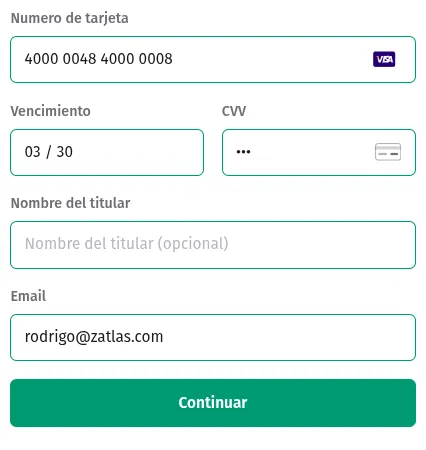
Card form — The guest enters their card number, expiry, CVC, name, and email. The SDK detects the card brand automatically.
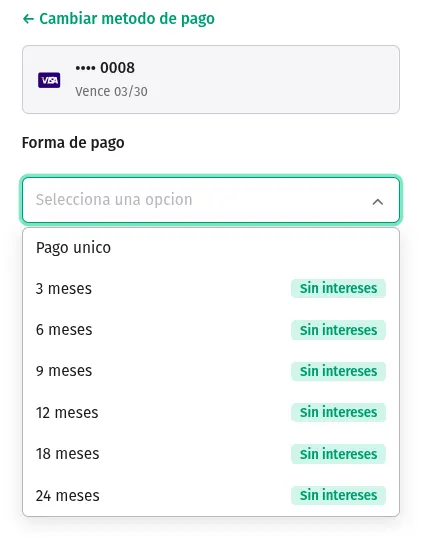
Installment picker — When installments are enabled and the card supports MSI, the guest chooses how many months to split the payment. Available plans depend on the card issuer.
Vanilla JavaScript
Section titled “Vanilla JavaScript”<div id="card-element"></div>
<script type="module">import { ZatlasCardCapture } from '@zatlas/card-capture';
const zatlas = new ZatlasCardCapture({ publishableKey: 'pk_sandbox_your_key', locale: 'es-MX',});
const card = zatlas.create('card', { mode: 'checkout' });card.mount('#card-element');
// Get a fresh access token from your serverconst { accessToken } = await fetch('/api/payment-token').then(r => r.json());
card.on('cta_clicked', async () => { const { payment, error } = await zatlas.checkout({ accessToken, amount: 12000, // amount in currency units (e.g. 12000 = $12,000.00 MXN) currency: 'mxn', reservationId: 'RES-123', installments: { required: true }, });
if (payment) { window.location.href = `/success?id=${payment.id}`; } else { console.error('Payment failed:', error.code); }});</script>import { useEffect, useRef } from 'react';import { ZatlasCardCapture } from '@zatlas/card-capture';import type { CheckoutResult } from '@zatlas/card-capture';
function CheckoutForm({ amount, reservationId }: { amount: number; reservationId: string }) { const cardRef = useRef<HTMLDivElement>(null); const zatlasRef = useRef<ZatlasCardCapture | null>(null);
useEffect(() => { const zatlas = new ZatlasCardCapture({ publishableKey: 'pk_sandbox_your_key', locale: 'es-MX', }); zatlasRef.current = zatlas;
const card = zatlas.create('card', { mode: 'checkout' }); card.mount(cardRef.current!);
// Get a fresh access token from your server const { accessToken } = await fetch('/api/payment-token').then(r => r.json());
card.on('cta_clicked', async () => { const result: CheckoutResult = await zatlas.checkout({ accessToken, amount, currency: 'mxn', reservationId, installments: { required: true }, });
if (result.payment) { window.location.href = `/success?id=${result.payment.id}`; } else { console.error('Payment failed:', result.error.code); } });
return () => { card.unmount(); }; }, [amount, reservationId]);
return <div ref={cardRef} />;}
// Wrap in your appexport default function App() { return ( <CheckoutForm amount={12000} reservationId="RES-123" /> );}Installments (MSI)
Section titled “Installments (MSI)”Meses Sin Intereses (MSI) lets guests split a payment across monthly installments with no extra cost to them. The SDK handles the installment picker UI inside the iframe.
How to enable
Section titled “How to enable”Pass installments: { required: true } in the checkout() options:
const { payment, error } = await zatlas.checkout({ accessToken, amount: 12000, currency: 'mxn', reservationId: 'RES-123', installments: { required: true },});When enabled, the iframe shows an installment picker after the card is tokenized. The guest selects the number of months (e.g. 3, 6, 9, 12, 18, or 24) and the SDK creates the payment with that plan.
What the guest sees
Section titled “What the guest sees”After entering their card details and clicking Continuar, the installment picker appears inside the iframe. The available plans depend on the card issuer and the payment amount. If the card does not support MSI, the SDK skips the picker and charges the full amount.
Reading the result
Section titled “Reading the result”The payment object includes the installment plan that was selected:
if (payment) { console.log(payment.installments); // { count: 6, perInstallment: 2000 }}3D Secure
Section titled “3D Secure”3D Secure (3DS) adds an extra authentication step where the card issuer asks the guest to verify the transaction — usually via a one-time code or biometric prompt.
How it works in checkout
Section titled “How it works in checkout”3D Secure is automatic in the checkout flow. You do not need to write any code for it. When the issuer requires 3DS, the SDK opens the challenge inside the iframe, waits for the guest to complete it, and then polls the payment status until it reaches a terminal state.
The promise returned by checkout() resolves only after 3DS is complete and the payment reaches a final status.
Decline banners
Section titled “Decline banners”When a payment is declined, the SDK automatically shows a banner inside the iframe with a message explaining what happened. The guest can correct the issue and retry without refreshing the page.
How they work
Section titled “How they work”- The SDK attempts the payment.
- The API returns an error code (e.g.
insufficient_funds). - The SDK maps the code to a localized message and displays it inside the card form.
- The promise resolves with
{ error }so your code can also react. - The guest can edit their card details and click Continuar again.
Decline messages
Section titled “Decline messages”| Error code | es-MX message | en-US message |
|---|---|---|
card_declined | Tu tarjeta fue rechazada. Intenta con otra tarjeta. | Your card was declined. Try a different card. |
insufficient_funds | Fondos insuficientes. Intenta con otra tarjeta. | Insufficient funds. Try a different card. |
expired_card | Tu tarjeta ha expirado. Usa otra tarjeta. | Your card has expired. Use a different card. |
incorrect_cvc | El codigo de seguridad es incorrecto. Revisalo e intenta de nuevo. | The security code is incorrect. Check it and try again. |
processing_error | Hubo un error al procesar tu pago. Intenta de nuevo. | There was an error processing your payment. Please try again. |
lost_card | Tu tarjeta fue reportada como perdida. Contacta a tu banco. | Your card was reported lost. Contact your bank. |
stolen_card | Tu tarjeta fue reportada como robada. Contacta a tu banco. | Your card was reported stolen. Contact your bank. |
generic_decline | Tu pago no fue aprobado. Intenta con otra tarjeta. | Your payment was not approved. Try a different card. |
The SDK picks the correct language based on the locale you set when constructing ZatlasCardCapture.
Customizing banner colors
Section titled “Customizing banner colors”You can customize the decline banner appearance via the theme:
const zatlas = new ZatlasCardCapture({ publishableKey: 'pk_sandbox_your_key', theme: { colors: { bannerErrorBackground: '#FEF2F2', bannerErrorText: '#781D1D', bannerErrorBorder: '#FECACA', }, },});Handling errors in code
Section titled “Handling errors in code”Even though the SDK shows a banner, you should also handle the error in your checkout() call for logging, analytics, or custom UI:
const { accessToken } = await fetch('/api/payment-token').then(r => r.json());
card.on('cta_clicked', async () => {  const { payment, error } = await zatlas.checkout({    accessToken,    amount: 12000,    currency: 'mxn',    reservationId: 'RES-123',  });
  if (error) {    // Log for your own analytics    console.error(`Decline: ${error.code} — ${error.message}`);
    // Optionally show your own UI above/below the iframe    showNotification(`Payment declined: ${error.message}`);
    // The guest can retry — no need to unmount or reset the card form    return;  }
  window.location.href = `/success?id=${payment.id}`;});
CheckoutOptions reference
Section titled “CheckoutOptions reference”| Property | Type | Required | Description |
|---|---|---|---|
accessToken | string | Yes | OAuth2 access token obtained from your server. |
amount | number | Yes | Payment amount in currency units (e.g. 12000 = $12,000.00 MXN). |
currency | string | Yes | ISO 4217 currency code, lowercase (e.g. 'mxn', 'usd'). |
reservationId | string | Yes | Your internal reservation or booking identifier. |
installments | { required: boolean } | No | Set { required: true } to show the installment picker. Defaults to { required: false }. |
metadata | Record<string, string> | No | Key-value pairs attached to the payment for your reference. |
description | string | No | Human-readable payment description for internal reference. |
CheckoutResult
Section titled “CheckoutResult”The promise returned by checkout() resolves with a CheckoutResult object. It always has either payment or error, never both.
Success
Section titled “Success”interface CheckoutResult { payment: { id: string; // e.g. "pay_abc123" status: 'succeeded'; amount: number; // amount in currency units (e.g. 12000 = $12,000.00 MXN) currency: string; methodId: string; // e.g. "mth_xyz789" installments?: { count: number; // number of months (3, 6, 9, 12, 18, 24) perInstallment: number; // amount per month }; threeDSecure?: { status: 'authenticated' | 'attempted'; }; }; error: null;}Failure
Section titled “Failure”interface CheckoutResult { payment: null; error: { code: string; // e.g. "card_declined", "insufficient_funds" message: string; // Localized message shown in the banner declineCode?: string; // Raw decline code from the processor };}Saving the card for future charges
Section titled “Saving the card for future charges”The checkout result includes a methodId (mth_...) that you can store on your server to charge the guest again later — for example, no-show fees, minibar charges, or recurring payments. No need to ask for the card again.
if (payment) { // Save methodId for future charges via the Payments API await fetch('/api/save-method', { method: 'POST', headers: { 'Content-Type': 'application/json' }, body: JSON.stringify({ methodId: payment.methodId, // 'mth_...' paymentId: payment.id, // 'pay_...' last4: payment.card.last4, brand: payment.card.brand, }), });}See Tokenization Integration for details on charging stored tokens via the Payments API.